
Google Analytics for SEO Optimisation: A Practical Guide
Google Analytics can help you understand how people find and use your website through organic search. It does not directly improve search rankings: Google Analytics data is not a direct ranking factor. Its value lies in showing what happens after someone arrives, so you can make better-informed decisions about content, user experience and conversions.
This guide explains how to use Google Analytics 4 (GA4) alongside Google Search Console to measure and improve your SEO performance.
What Google Analytics can tell you about SEO
GA4 helps you assess how organic visitors behave on your site. Depending on your setup, you can use it to see:
- How many sessions come from organic search
- Which landing pages attract organic visitors
- Whether visitors engage with your content
- Which actions visitors take, such as making an enquiry or completing a purchase
- How organic performance varies by device, location or audience
These insights can help you identify pages that deserve attention. For example, a page may attract plenty of organic traffic but generate few enquiries. That could be a sign that the content, page layout or call to action needs improvement.
Set up GA4 to measure organic search
Before using GA4 for SEO analysis, check that your property is collecting reliable data.
- Install the GA4 tag. Add the Google tag to your website, either directly or through Google Tag Manager. Test that events are being recorded correctly.
- Check your data stream. Confirm that the correct website URL and domain are configured in your GA4 web data stream.
- Filter internal traffic where appropriate. Your team’s visits can distort engagement and conversion data. Configure an internal traffic rule and test it before excluding that traffic from reports.
- Define key events. Track meaningful actions, such as completed purchases, submitted forms or bookings. In GA4, important events can be marked as key events for reporting.
- Review consent and privacy settings. Make sure your analytics implementation follows applicable privacy and cookie requirements. Consent choices can affect how much data is available.
Data collection may be affected by consent settings, browser restrictions, ad blockers and tracking configuration. Treat analytics figures as useful estimates rather than a perfect record of every visit.
Connect Google Analytics and Search Console
GA4 and Google Search Console measure different parts of the search journey. Search Console reports on how your site appears in Google Search, including impressions, clicks and average position. GA4 reports on what visitors do after they reach your site.
Linking the services can make it easier to compare search performance with on-site behaviour. You will need the appropriate permissions for both accounts. After linking, Search Console reports may take time to appear in GA4, and the available data is subject to each product’s reporting limits.
Use the two tools together rather than treating either as a complete picture. For instance, Search Console may show that a page receives impressions but few clicks, while GA4 can help you assess the experience of visitors who do click through.
Find your organic search traffic in GA4
In GA4, the Traffic acquisition report groups visits by traffic source and medium. Organic search is commonly shown as the Organic Search channel, although the exact classification depends on how traffic is tagged and how GA4 processes it.
To investigate organic performance, review metrics such as:
- Sessions: Visits attributed to organic search
- Engaged sessions: Sessions that meet GA4’s engagement criteria
- Engagement rate: The share of sessions that were engaged
- Key events: Important actions recorded on your site
- Revenue: Revenue recorded for relevant e-commerce events
Do not judge SEO success by traffic alone. A smaller number of relevant visitors who complete valuable actions may be more beneficial than a large increase in visits with little business impact.
Analyse organic landing pages
A landing page is the first page a visitor sees during a session. Reviewing landing-page performance can reveal which pages attract organic visitors and whether those visits lead to useful outcomes.
Compare landing pages by organic sessions, engagement and key events. Look for patterns such as:
- Pages with growing traffic and strong conversion rates
- Pages that attract visitors but have low engagement
- Important pages that receive little organic traffic
- Pages with a sudden change in traffic or performance
Use these findings as prompts for investigation, not as automatic proof that a page is successful or unsuccessful. Low engagement can have several explanations, and some pages may answer a visitor’s question quickly without requiring further interaction.
Use SEO data to improve content
Analytics can help guide content improvements when combined with search data and knowledge of your audience. If a page earns organic visits but few key events, check whether it matches the intent behind the search, answers the visitor’s main question and provides a clear next step.
Search Console can help identify the queries and search appearances associated with a page. GA4 can then show how visitors behave after arriving. Together, these insights can inform decisions such as:
- Updating outdated or incomplete information
- Making headings and page structure easier to scan
- Adding relevant internal links
- Improving page speed and mobile usability
- Making calls to action clearer and more useful
Make changes based on evidence and review the results over an appropriate period. Search visibility can fluctuate for many reasons, so avoid attributing every change to a single content edit.
Measure SEO conversions and business results
Organic search is a channel, not an outcome. Decide what a valuable result means for your website, then configure GA4 to measure it. A service business might track completed enquiry forms, while an online shop may track purchases and revenue.
Make sure events are triggered only when the intended action is completed. For example, a form submission should not be counted merely because a visitor viewed the contact page. Test events in GA4 before using them in reports or dashboards.
When assessing conversions, consider the full customer journey. A visitor may first discover your business through organic search and return later through another channel. Attribution reports can help explore these journeys, but they rely on available data and should be interpreted with care.
Common mistakes to avoid
- Assuming GA4 improves rankings. Analytics measures performance; it does not optimise a site or directly raise its position in search results.
- Relying on one metric. Traffic, engagement and conversions each tell only part of the story.
- Comparing inconsistent date ranges. Account for seasonality, promotions, site changes and changes in tracking.
- Ignoring tracking quality. Duplicate tags, missing events or incorrect channel classification can undermine analysis.
- Making changes based on very little data. Small samples can produce misleading conclusions.
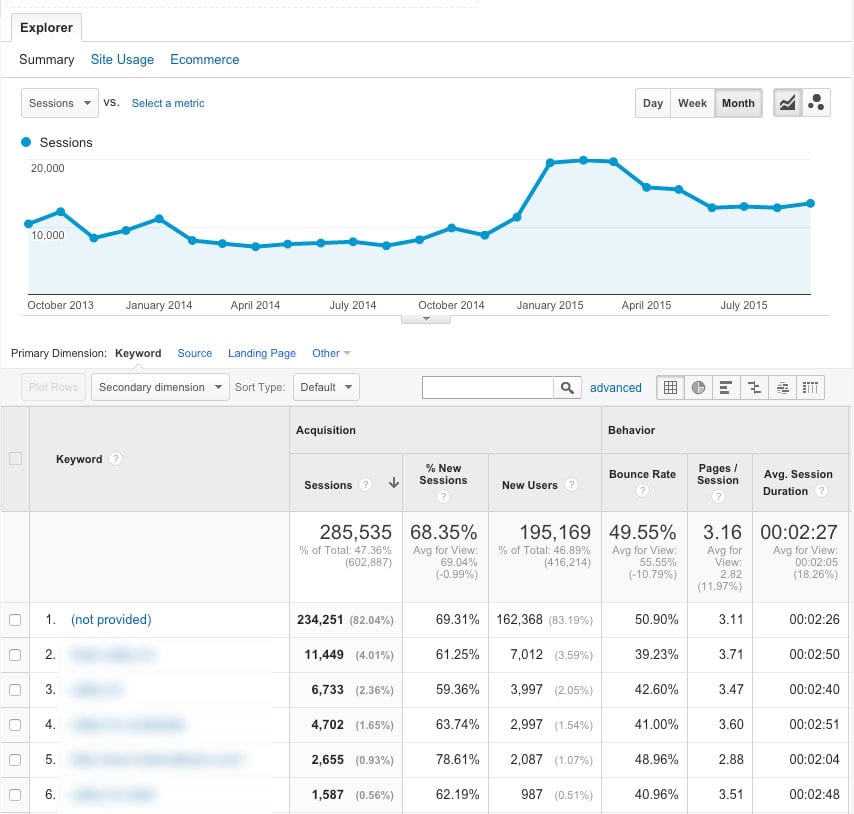
- Expecting GA4 to show organic keywords. Search queries are primarily reported in Search Console, not GA4.
A simple monthly SEO measurement routine
- Check organic sessions and key events in GA4.
- Compare performance with the previous period and the same period last year, where suitable.
- Review the landing pages responsible for meaningful traffic and conversions.
- Use Search Console to investigate impressions, clicks, queries and search appearance.
- Check for tracking issues or major changes to the website.
- Choose a small number of evidence-based improvements and measure their impact.
Frequently asked questions
Does Google Analytics affect SEO rankings?
No. Google Analytics is a measurement tool and does not directly improve a website’s rankings. It can help you understand visitor behaviour and identify opportunities to improve your website.
Can GA4 show which keywords bring visitors to my site?
GA4 does not normally provide the organic search queries people used. Use Google Search Console to review search queries, clicks, impressions and average position.
Which GA4 metrics matter most for SEO?
The most useful metrics depend on your goals. Organic sessions, landing-page performance, engagement and key events can provide a helpful starting point. For online shops, revenue and purchase data may also be important.
How often should I review SEO performance?
Many website owners review key indicators monthly and investigate significant changes as they occur. The right frequency depends on traffic volume, business needs and how often the site changes.
Conclusion
Google Analytics supports SEO optimisation by showing what organic visitors do after reaching your website. When you configure GA4 carefully, measure meaningful actions and combine its reports with Google Search Console, you can make more informed decisions about content, landing pages and user experience.
The aim is not simply to increase visits. It is to attract the right visitors, give them a useful experience and help them take actions that matter to your organisation.
Enhancing SEO with Google Analytics: Key Benefits for Optimising Search Performance
- Tracks organic search traffic
- Identifies high-performing landing pages
- Highlights user engagement
- Measures SEO conversions
- Reveals content improvement opportunities
- Supports data-led SEO decisions
Five Limitations of Google Analytics in SEO Optimisation
- Does not directly improve search rankings.
- Organic keyword data is limited in GA4.
- Tracking can be affected by consent settings.
- Setup errors can distort reports.
- Data often needs careful interpretation.
Tracks organic search traffic
Google Analytics helps you track organic search traffic, showing how many visitors arrive at your website through unpaid search results and which landing pages they visit. By monitoring these patterns over time, you can identify content that attracts search users, spot changes in performance and focus your SEO efforts on the pages and topics that bring the most relevant visitors.
Identifies high-performing landing pages
Google Analytics helps identify high-performing landing pages by showing which pages attract organic search visitors and how those visitors engage with your website. By comparing metrics such as organic sessions, engagement and key events, you can see which pages are delivering valuable results. These insights help you understand what is working and guide improvements to other pages, such as refining content, strengthening calls to action or adding relevant internal links.
Highlights user engagement
Google Analytics helps highlight user engagement by showing how visitors interact with your website after arriving from organic search. Metrics such as engaged sessions, engagement rate, time spent on a page and key events can indicate whether your content is useful and easy to navigate. Reviewing these insights helps you identify pages that hold visitors’ attention, as well as those that may need clearer information, stronger internal links or a more relevant call to action.
Measures SEO conversions
Google Analytics helps you measure the conversions generated by organic search, not just the visits. By tracking valuable actions such as purchases, enquiry form submissions or bookings, you can see which SEO landing pages contribute to your business goals. This makes it easier to assess the impact of your SEO efforts, identify pages that may need improvement and focus on attracting visitors who are more likely to take action.
Reveals content improvement opportunities
Google Analytics helps reveal content improvement opportunities by showing how visitors interact with your pages after arriving from search. If a page attracts organic traffic but has low engagement or few meaningful actions, it may need clearer headings, more useful information, stronger internal links or a more relevant call to action. Combined with Google Search Console’s query data, these insights can help you refine content to better match what people are looking for.
Supports data-led SEO decisions
Google Analytics supports data-led SEO decisions by showing how organic visitors interact with your website. You can identify which landing pages attract visitors, where people engage or leave, and which visits lead to enquiries, purchases or other valuable actions. These insights help you prioritise content updates and website improvements based on real user behaviour, rather than guesswork.
Does not directly improve search rankings.
One limitation of using Google Analytics for SEO optimisation is that it does not directly improve search rankings. It measures how visitors find and use your website, but it cannot change your position in Google Search or guarantee better visibility. Analytics data can help you identify pages to improve, yet ranking gains depend on the quality and relevance of those improvements, alongside other factors such as technical SEO, competition and Google’s algorithms.
Organic keyword data is limited in GA4.
A key drawback of using GA4 for SEO optimisation is its limited organic keyword data. GA4 can show how visitors from organic search behave after reaching your website, but it generally does not reveal the specific search queries they used. This makes it harder to connect keywords with engagement or conversions using GA4 alone. For query-level insights, you’ll need to use Google Search Console alongside GA4, while keeping in mind that the two tools report different types of data.
Tracking can be affected by consent settings.
One drawback of using Google Analytics for SEO optimisation is that tracking can be affected by users’ consent choices. If visitors decline analytics cookies, some of their activity may not be recorded, leaving gaps in your reports and making traffic, engagement and conversion figures less complete. As a result, treat the data as an indication of performance rather than a full account of every visitor, and make sure your tracking and consent settings comply with applicable privacy requirements.
Setup errors can distort reports.
Setup errors can distort Google Analytics reports, making it difficult to understand how well your SEO is performing. Incorrect tracking codes, duplicate tags, misconfigured events or poorly defined traffic filters can lead to visits and conversions being missed or counted more than once. As a result, decisions based on the data may be misleading. Regularly checking your GA4 setup and testing key events can help keep reports reliable.
Data often needs careful interpretation.
One drawback of using Google Analytics for SEO optimisation is that its data often needs careful interpretation. A rise or fall in organic traffic does not automatically mean that an SEO change has succeeded or failed; seasonality, changes in user behaviour, tracking issues and other marketing activity may also affect the figures. Looking at several relevant metrics, comparing consistent time periods and checking findings against Google Search Console can help avoid misleading conclusions.
Leave a Reply